An experimental project which was created a while ago. Blog explores misc topics such as Animation, Attack collision, AI, Nvidia Apex Desctruction, etc..
Attack Collisions
When the character swings his sword the animation creates shapecasts. These are volumes that detect hits in the world. My implementation creates multiple shapecasts along the sword. But let's imagine 1 box going along sword's blade. We want to shoot this box from the sword's last location to the current one and everything it hits along the path we record into some variable. Now we can do some processing based on the hits, whether the character deals damage to an enemy or an object or whether the hit was an impenetrable wall that leave the character stuttering.
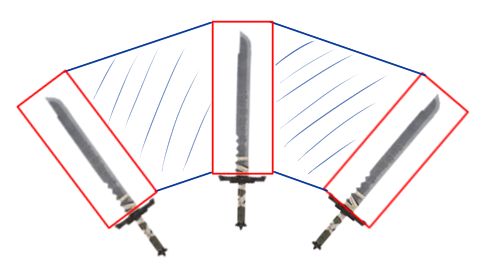
Red box is starting position, blue is travelled distance. Our reach would be shorter if we skipped the middle sword.
Any Problems with this implementation?
Yes, multiple. First we these shapecasts are triggered by animation events. This means shapecasts are framerate dependent see videos below. Lower tier computer might not manage to keep up 120 frames per second, which creates inaccuracies, the sword might go through an enemy without hitting it. The problem is also prevalent when the framerate fluctuates. It is unreasonable for the player to miss an attack when it clearly hit. Other problem with the shapecasts are that, they cannot be rotated while shapecasting. The code currently uses sword's last location's rotation. So if the sword suddenly rotates 90 degrees in a single frame, be it due to lag, we are going to lose a lot of precision.
Animation
The animations are gotten from Adobe's Mixamo or Epic's Marketplace. Some animation are modified a bit either in Blender or Unreal Engine.
Physics Blending
When the character is hit with a massive force it starts ragdolling
Minor impacts are handled with physics blending, giving the character a stuttering animation.
Luckily Unreal provides this blending out of the box. What you'll need is just set up constaints properly in the mesh's physics section and enable physics blending. Creating proper constraints and parameters are mostly just number twiddling to see what yields decent results. Here is a good source for more information about physics blending and parameter twiddling.
Source: Physics Animation in Uncharted 4: A Thief's End
Stuttering animation done by physics blending.
Standing up
When the character finally stops ragdolling it can choose between two animations either stand up when lying on its back or on its stomach. The animation is decided by the hip bone's rotation. Imagine shooting a ray from the bone to the direction where the bone is facing. If the ray has positive z-axis direction, ie. pointing up, character is probably lying on its back more than on its stomach. We choose standing up from lying back animation.
Standing up from back position
Standing up from stomach position
Rolling Animation
The problem with rolling was that the character's body parts deviates from the center body (or rootbone) too much. So, if the character is facing a wall while rolling, the character mesh clips into it, since the collision is handled by collision volume shape. Ragdolling does not have this issue, since the body parts are simulated as physics objects in the game world ie. they have their own collision. One could probably simulate physics by rolling, but this might not yield desirable results. The other solutions are just have a new animation - which is too much work. What I did was just move root bone backwards at the start of the rolling animation (linearly of course). What is rootbone? Think of it as a point in space that stands right between characters legs. If we move this the character's mesh moves with it. This offsets mesh's location relative to the collision volume.
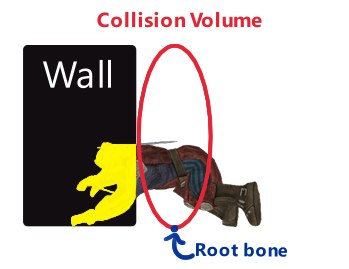
Character cliping into wall
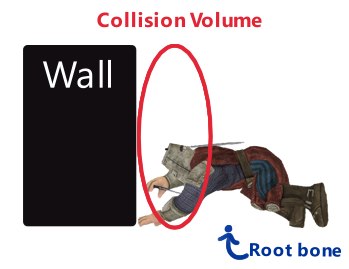
Rootbone moved at the start of animation and linearly interpolates back overtime
Another solution is to render the character into a stencil buffer and force the rendering of the mesh infront of everything. I was not aware of this solution at the time.
Destructible shield
Uses Nvidia's destruction system. It takes care of the creation of the pieces when player inflicts damage to it. Based on the configuration of the pieces and the damage player makes, pieces are detached from the shield's mesh on a hit. The center pieces are supporting structures, if these things break off, the whole structure falls apart.Now, we don't want to have all the pieces to be of a supporting type, since the damage spreads out neighbouring pieces type is set to default. This means an attack breaks more pieces off from the shield.So, we don't want to hit all the center pieces or the whole shield will break apart. When player hits the center of the shield, we manipulate the hit a bit by moving the hit location towards to the outer edge. After three hits we explode the shield fully. Leaving the evil skeleton without his wooden cover. Some hits are able to overwhelm the shield and explode it completely on a hit. For example spartan kick.
Destructible shield
Spartan kick to destructible shield
AI
AI is simple in this project. Unreal provides a navigation mesh, which AI uses to traverse the world and a basic brain component, a statemachine, based on which the AI character makes its decisions.
Idle traversing or "patrollig"
AI character chooses a random point on navigation mesh and travels towards that point. If it sees an enemy it will immediately charge towards it. Seeing is done by a sensing component. There are two main components hearing and seeing. My implementation only uses sight.
Combat
So, combat starts by charging towards an enemy with a high speed. If the charge hits an enemy it will cause great damage and leave the enemy's mesh ragdolling until it can recover. After charge begins basic melee combat in which the AI follows the enemy and uses basic sword attack or shield bash to defeat it. The enemy can run from the AI and if the AI doesn't see the player for a while, it reverts back to patrolling.
Basic sword swing
This attack has a cooldown. Otherwise AI character is just trying to orient's its body and shield towards incoming attacks.
Shield bash
This attack can be performed any time, when the player is getting to close. The node in the Behavior Tree predicts the player's future position and based on that the AI can choose to use shield bash. It knocks the player backwards.
Shield bash has no cooldown
HUD
Implements basic drag and drop operation to inventory or back into the world. This is shown at the end of the video.